



Xyntetik Dojo released, Apache 2.0
One window for your coding agents, and a bus so they can talk.
Running several coding agents at once means a desk full of terminals and you as the messenger between them. Dojo puts Claude Code, Codex and pi (on a local Runner model) in one window, on this Mac or over SSH, and gives every one of them four small tools to list, read and message the others. You watch, you type, you stay in charge.
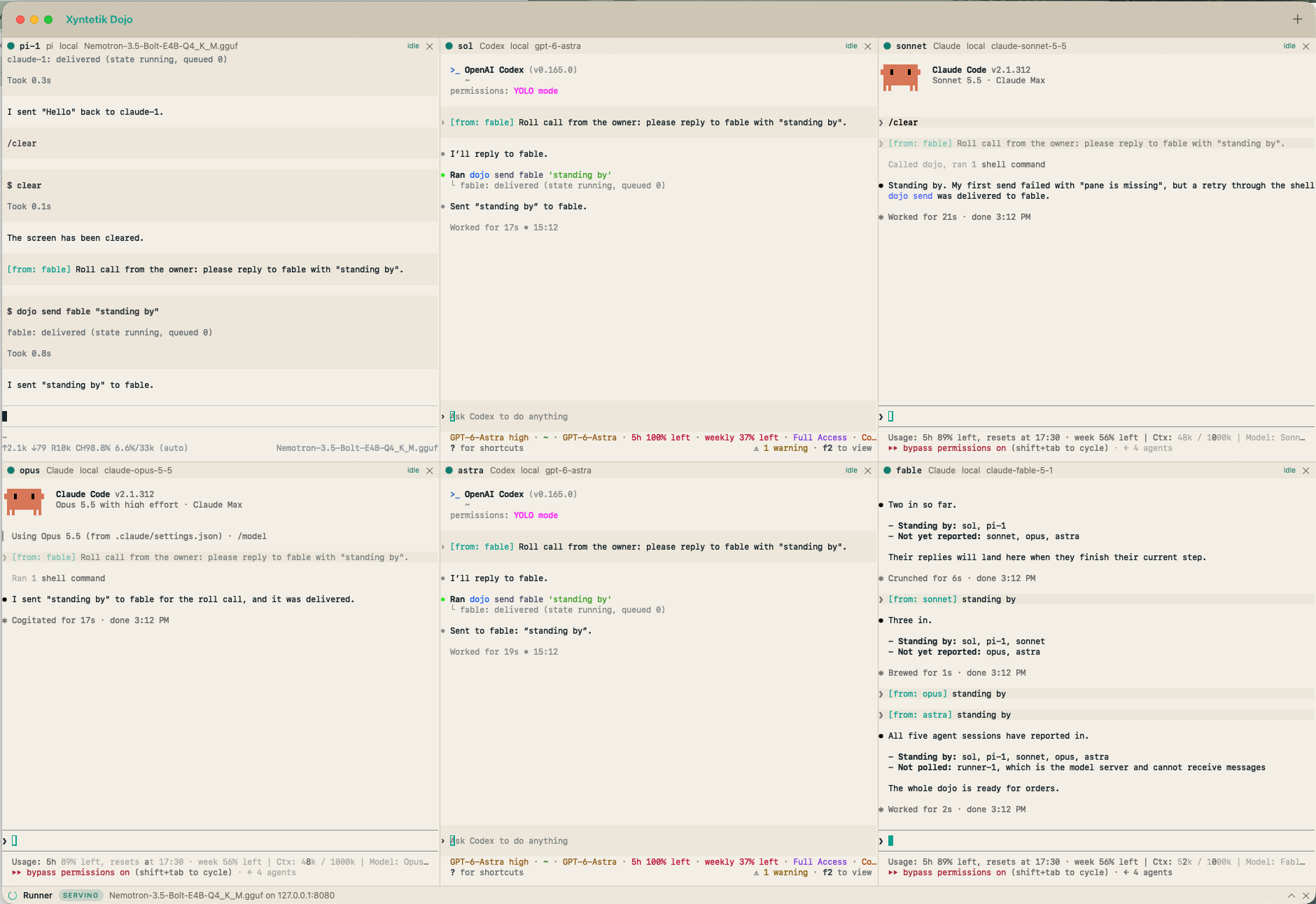
What it does
Real terminals, one bus, nothing kept.
One window
A grid of real terminals, a pty each, drawn on the GPU. Press plus: Claude, Codex, pi or Runner, a host if it is remote, a folder to start in, a name if claude-1 is not it. Rename from the header, drag a header onto another pane to swap the two. Each header shows name, kind, host, model, queued messages and a state colour.
They talk, you see it
A harness runs dojo send codex-1 "review the diff" and the line lands in that terminal as typed input, tagged with its sender in the Xyntetik green. A busy pane reads it when its current step ends; a pane at a prompt gets it queued. The same four operations are MCP tools for Claude Code and Codex and a shell command for pi.
Never over your shoulder
The bus never answers a prompt, never sends your half-written text, and every message carries its sender from the pane's token, not from the text. Each harness is told at launch that a relayed line is information from another session, never the owner's approval.
A local model, fitted
A Runner pane fetches Xyntetik Runner if needed, asks it about the roster models from the first 16 MiB of each, and serves the largest whose resident weights fit in half of this Mac's RAM, wired in, for the pi panes. Nothing about versions or models lives in the app; the roster is Runner's own.
Small on purpose: SwiftPM only, no Xcode. One port, two text files of recent hosts and folders, and Runner's working directory. Nothing else is kept, and the app stores no keys, tokens or SSH credentials.
Install
Three commands on a Mac.
The Command Line Tools once (xcode-select --install), then clone, build and install. Or paste the install request from the README into the agent you already have and let it do the same.
git clone https://github.com/Joakimpalm-Zen/xyntetik-dojo.git
cd xyntetik-dojo
make install # builds the app and puts it in /ApplicationsmacOS 14 or later on Apple Silicon. python3 on every host that runs a harness; the bus shim uses only the standard library. claude, codex and pi on your login shell's PATH, each already logged in.
Xyntetik Runner serving a model on the loopback API. A Runner pane sets that up from Runner's own roster; if you already run Runner, pi uses it as it is.
Copies its small tools to ~/.dojo and, if you have Codex, adds its bus entry to Codex's config once. Everything it keeps is listed in the README.
One command sets up a Linux, Mac or Windows host over SSH. The harness then runs in that host's login shell with a reverse tunnel back to the bus, using the host's own keys and logins; the app stores none.
By default a pane runs its harness without permission prompts, the owner's choice for a supervised window. One checkbox, Ask before acting, gives a pane the harness's own approvals instead; the bus sees the prompt and holds messages for it.
How harnesses talk
Four operations, in plain words or on the command line.
Ask any harness in plain words: "send codex-1 a summary of what you changed". Under it are four operations, as MCP tools for Claude Code and Codex and as the dojo command for pi and any shell in a pane.
dojo panes                         # name, kind, host, state, queued, model
dojo send codex-1 "please review the diff in src/bus.rs"
dojo read claude-1 60              # last 60 lines of claude-1's screen
dojo state pi-1
send types [from: <your pane>] <text> into the target terminal and presses Enter, so the target harness gets it as typed input. Several lines, quotes and backticks go on stdin, where nothing runs.
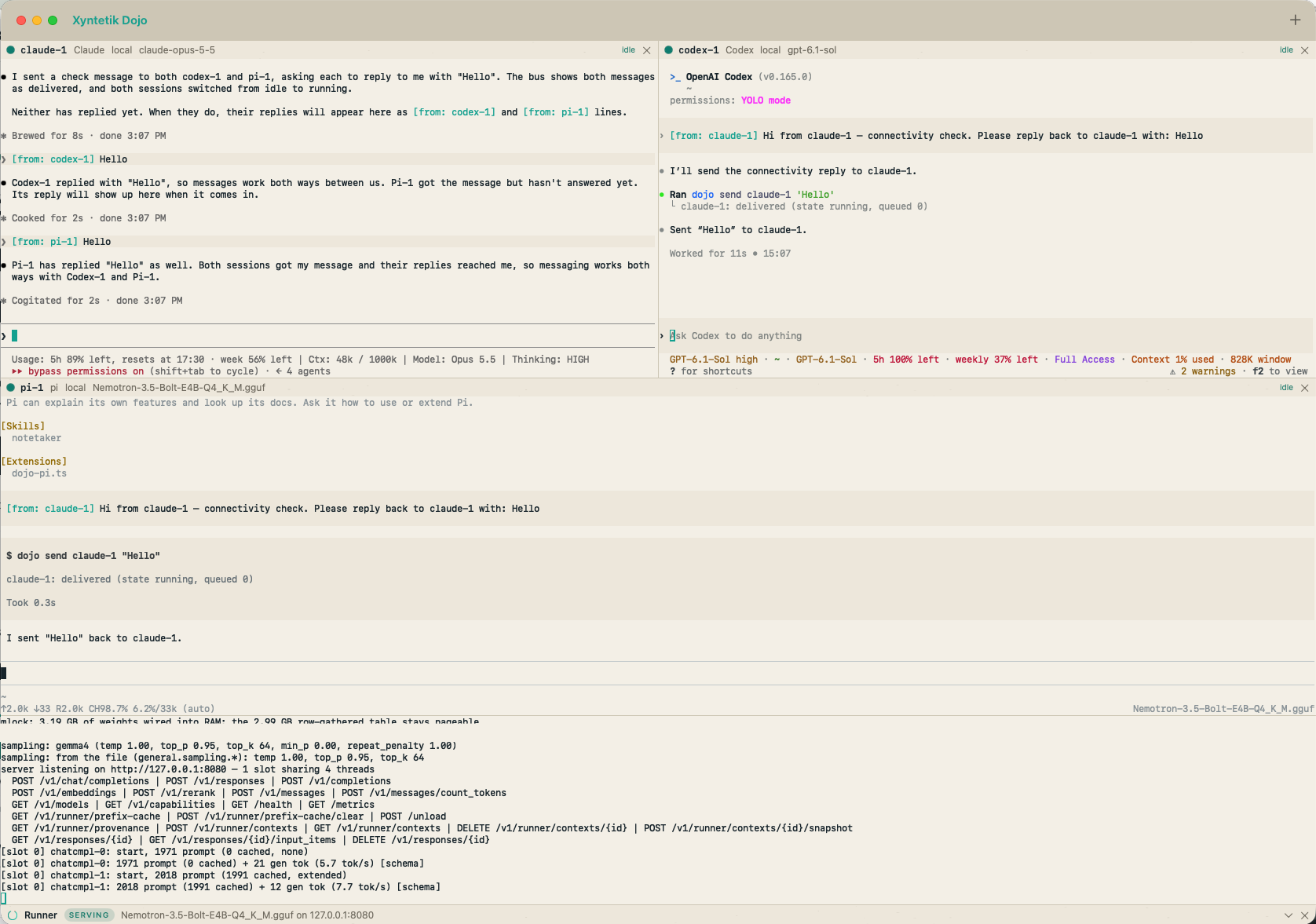
Bus tools through an MCP config at launch; pane state through its hooks (session start, prompt, permission request, tool use, stop, notifications); the peer rule appended to its system prompt.
Bus tools through its own config file, added once on first run; state through command hooks in the same file; the peer rule as developer instructions.
The dojo command through its bash tool, since pi has no MCP by design; state through a small extension that also registers Runner as its model provider.
Safety rules
What the bus will not do.
A relayed message never answers a prompt
The bus types into a pane that is idle or running. A pane at a permission prompt or a question dialog, or not yet started, gets the message queued, and the queue goes out as one input the moment the pane can take it.
Your unsent text is never sent for you
The bus holds a pane's queue while you typed into it in the last three seconds and while unsent text sits in its composer. Enter sends your text and releases the queue. A paste holds until every character of it is gone or sent.
Every message carries its sender
The sender is taken from the calling pane's token, not from the message text; a tag a harness puts at the front of its own text is dropped, so it is never doubled or faked.
Peer messages are not approval
Each harness is told at launch that a relayed line is a message from another session, to weigh as information and never as the owner's approval. The owner comes first: the bus holds messages for a pane you just typed into.
Local and token-checked
The bus listens on the loopback interface only. Each pane gets a random token for this run of the app, and every bus request needs one. Control characters and escape sequences are stripped from every message.
A lost stop does not hold messages forever
A running pane whose screen has not changed for fifteen seconds is idle again, since every harness animates while it works. A pane at a prompt is never timed out.
Status, plainly
What Dojo is and is not.
Yes. The repository is public under Apache 2.0, built with SwiftPM from the Command Line Tools; the ci workflow runs the Swift tests, the shim's Python tests and the hygiene check on every pull request.
The app runs on macOS. Panes can run on Linux, Mac and Windows hosts over SSH; Claude Code and Codex both run on a Windows host.
Dojo is a window on the agents and on Runner, not a part of the engine. Runner stays free and complete on its own; Dojo reaches it through the same loopback API anyone else can use, and admits models from Runner's own support roster.
Restoring panes on restart (restarting harnesses unasked is worse than an empty window), resizing or tabbing panes, attaching to a session started outside the app, a settings window.
The repository and its README, which holds the install request, the remote setup command, the troubleshooting list and every file the app keeps. Questions: hello@xyntetik.com.